Image Warping and Face Morphing
Abstract
In the last project we used filters to transform images. In the context of images as functions this can be thought of as transforming the range of an image. In this project rather than transforming the range of an image we transform the domain of an image which is referred to as warping and image. We use warping and interpolation in order to transform from one human face to another as well as to experiment with averages of images.
Introduction
In this project our main goal is to merge two images using image warping and cross-dissolving. Image warping involves performing some transform on the domain of our image. This will essentially map the pixel value at every (x, y) pair to some new (x‘, y‘) as defined by the transform. For certain transformations such as rotation we can represent this transform between the two coordinate systems as a 2x2 matrix. For other transforms such as translations or affine transforms we need to use homogenous coordinates in order to gain more degrees of freedom. Homogenous coordinates take the form (x, y, 1) and transformations between homogenous coordinates can be represented as 3x3 matrices.
From general intuition warping appears straight forward once we have our transformation matrix M. We simply apply M to every (x, y, 1) in our image and copy the pixel value at (x, y) to the pixel value at (x‘, y‘) in our output image. We can see that there are some cases where this approach has issues. Firstly there is no guarantee that our (x‘, y‘) will be within the bounds of our image, but this can be fixed by simply ignoring points that are out of bounds. The bigger issue is realized once we consider that x‘ and y‘ may not be integers and instead fall between pixels in our new image. If we simply choose to ignore these cases our resulting image will be full of holes where we are missing pixels. We could simply make all the pixels surrounding our in between value the same color as the input coordinate which is known as splatting, but this could end up in blurring and aliasing of our final image.
An alternative approach which we will use in this project is to calculate the inverse transform which maps from (x‘, y‘, 1) to (x, y, 1) and apply this transform to all (x‘, y‘) in our final image to get the pre-coordinates for our original image. We still have the issue that all of our pre-coordinates may not be integers our be in bounds, however because the original image is a function that we already know we can use interpolation in order to get the values at all integer pixel values. Since our transform is represented as a 3x3 matrix we can get the inverse transform by taking the matrix inverse of the transform which for all of our purposes always exists.
We will also use cross-dissolving for merging our images. Cross-dissolving can be thought of as a weighted average between two values. Thusly we can take some value alpha which is always between 0 and 1 and some other value 1 - alpha as our weights in order to cross-dissolve values. We will use this for calculating the merged shape and merged color for different values of alpha.
Correspondences
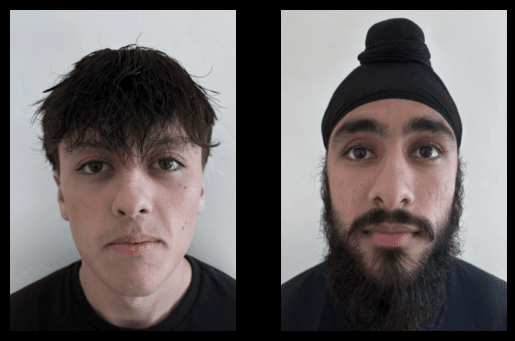
We will start with the following two images of myself (left) and my friend Amitoj (right):
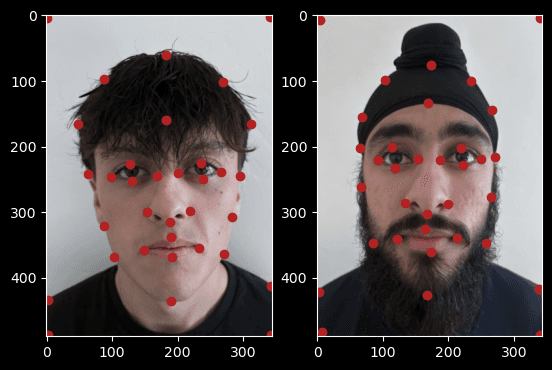
In order to merge two images we will first have to find corresponding points in each of the images. These key points will indicate hand picked features in either image which should line up with each other. For a human face these key points could line up the eyes, mouth, nose, or any other similar location between faces. Below are images with the key points selected:
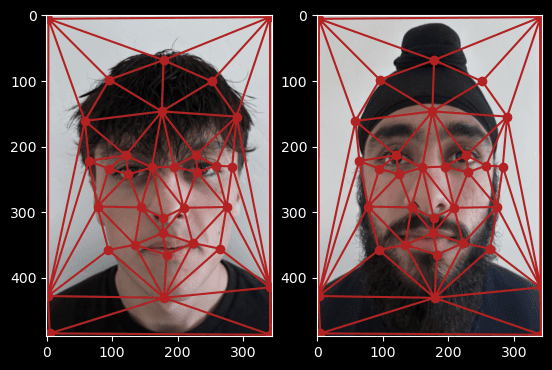
Now with our key points selected we can reason about what it means to merge two faces. The merged image should have some notion of features which are in between the features of either of the input images. From this intuition it then makes sense to split up our faces into several regions as defined by our selected correspondence points and perform some transform on either of our input images and some selected points which lie in between the pairs of correspondence points of our original images. We will first need to define the regions for both images. Since we are attempting to match these regions then transform between them we will want some consistent labeling of regions in between images. We can let groups of 3 correspondence points define each region which is a method known as triangulation. We will use an implementation of this method called Delauney triangulation which optimizes size of angles inside each triangle by maximizing the minimum angle of all triangles. As long as the regions are defined consistently across images our merge will work, but we chose to take the triangulation of the averages of our key points in order to make our merge a better fit which is overlaid on our images and displayed below:
Midway Face
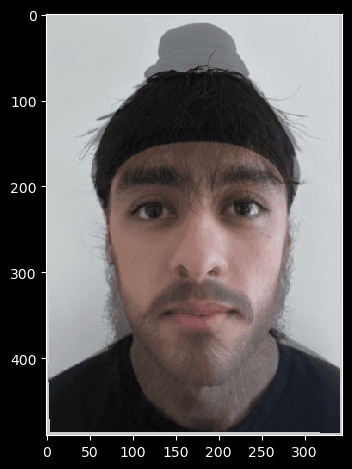
With our correspondence points and triangulation defined we can now move on to calculating the midway face of our two images. We will do this in several parts. First for each image we will compute the affine transformation between each triangle and the corresponding triangle defined by the average points. Secondly we will apply these affine transformations using inverse warping to each region defined by the original images triangles and get the pre-coordinates of the midway image shape for each image. Thirdly we will interpolate our pre-coordinates in order to get valid coordinates from our original images which we can then use to calculate the midway shape images for both of our input images. Finally we will take these midway shape images and cross-dissolve them with an alpha of 0.5 in order to get our final midway image.
To calculate the affine transformation between every triangle in one image and a triangle from the average points we can realize that affine transformations are defined by some matrix of the form:
From this we can use the fact that we have 3 points which each give us 2 unique sources of information to solve for the 6 variables in our affine transformation. By rearranging our equations we can arrive at the result:
After calculating this transform for every triangle, applying the transforms, and interpolating using scipy’s map_coordinates and our original images we arrive at the midway images for each of our two images.
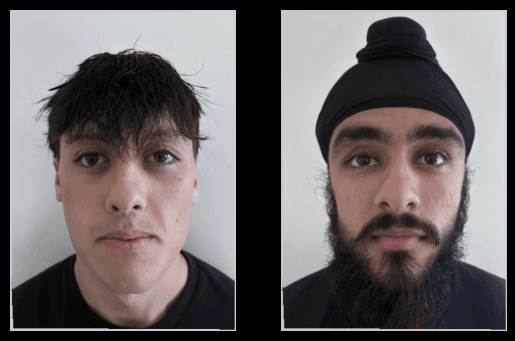
Finally we can cross dissolve these images with an alpha of 0.5, which will result in the midway image between our two original images.
Merging
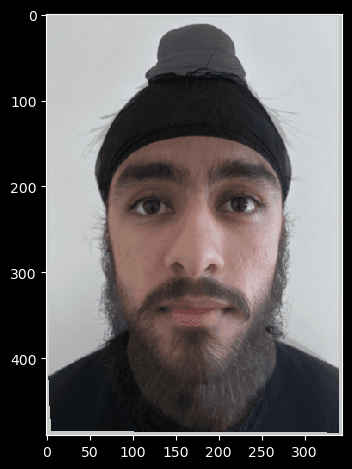
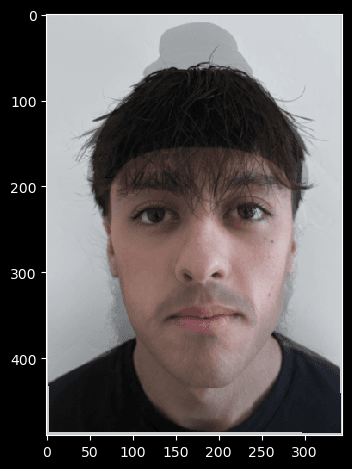
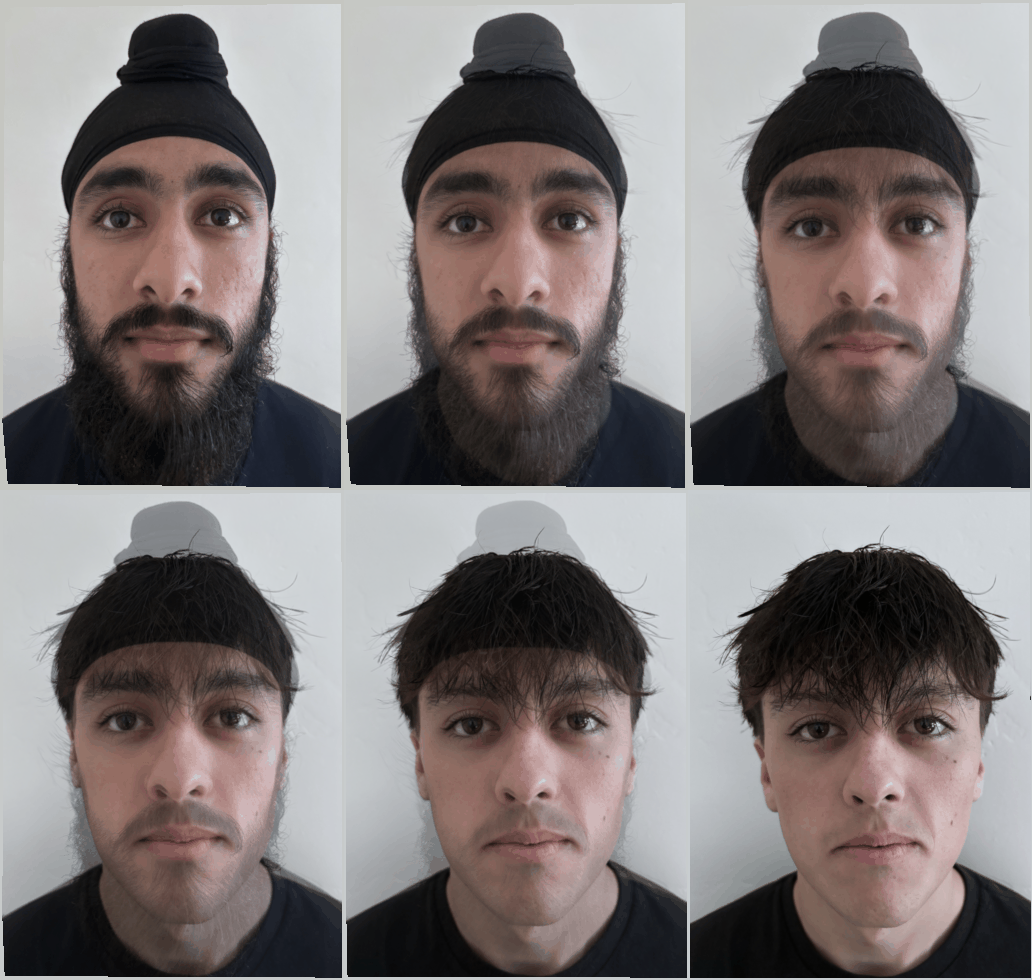
In this section we will extend the previous section by creating a method to merge images with varying degree. We will make two simple changes from our algorithm in the previous part. Rather than using the triangles from the average key points between each image, we will use a weighted average as defined by the variable warp_frac. Similarly rather than cross-dissolving the image with an alpha of 0.5 we will cross-dissolve with a value of dissolve_frac. With these change we can modify the algorithm from the previous part to get a morph algorithm which yields the following results:
By merging at many different timestamps and stitching them together we can create a gif of the transformation between one image and another.
Average of a Population
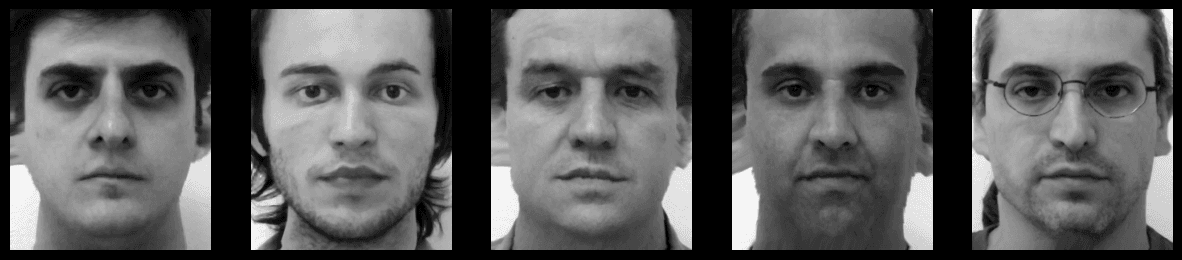
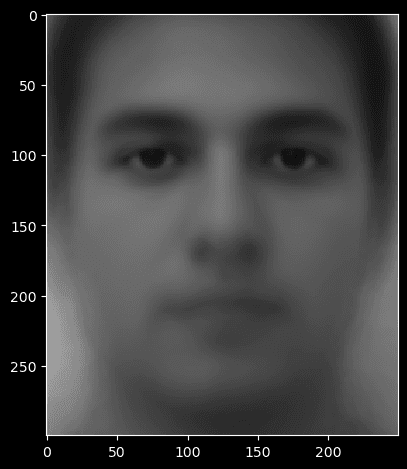
With our merging algorithm we can now explore one interesting application using the mean of a population of images. We will use a set of pre-labeled, pre-aligned faces from the FEI Face Database. If we take the mean of all non-smiling faces in our population we get the following average image with the average points and triangulation shown below.
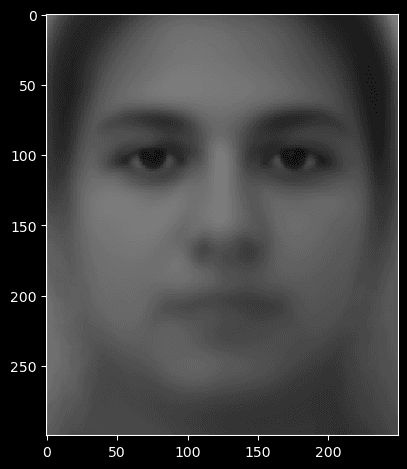
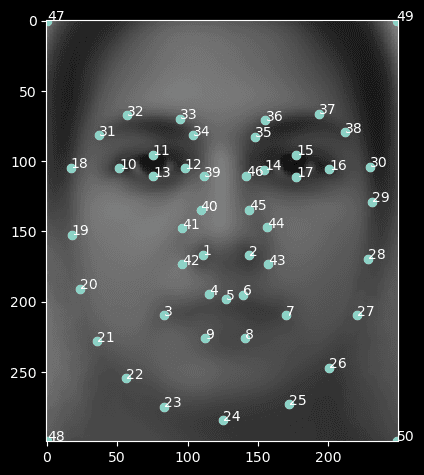
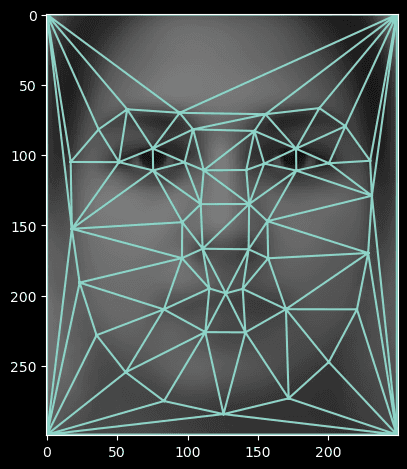
We can use our morph algorithm in order to morph the shape of images from our population into the shape of of the average image which yields the following result:
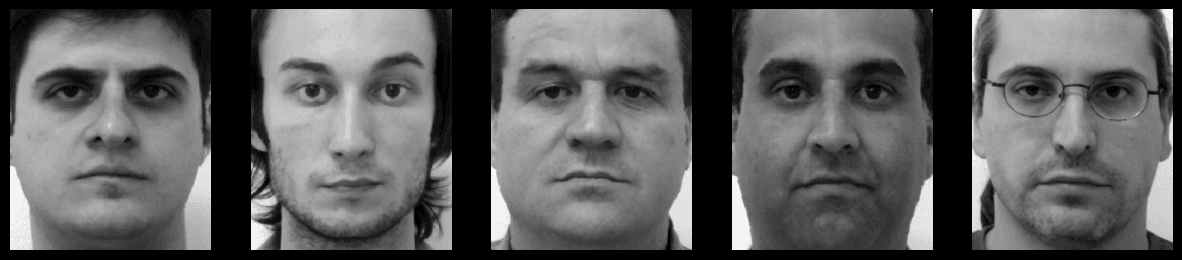
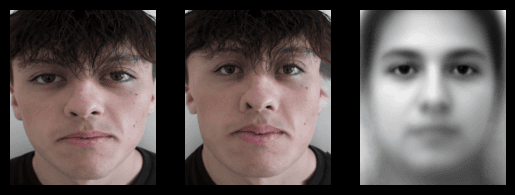
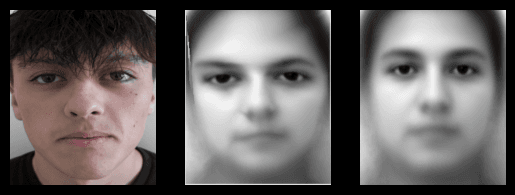
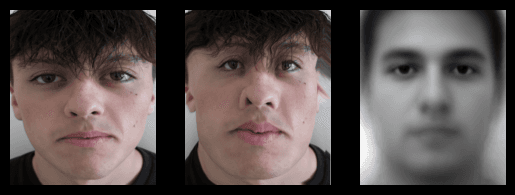
We can also morph my face into the shape of the average population face, and morph the average population face into the shape of my face. In the first case we use a warp_frac of 1 anddissolve_frac of 0. In the second case we flip these and use a warp_frac of 0 and dissolve_frac of 1.
Extrapolation
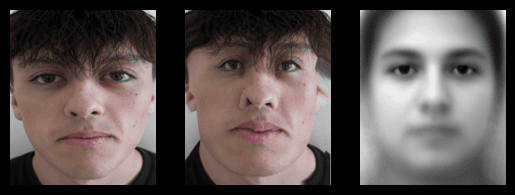
If we use a warp_frac in between 0 and 1 we get some in between image shape of our original two images. We can also increase this value in order to extrapolate from our two images and generate a charicature of one of our images based on extending the features of the other image. For example we can use a warp_frac of 1.5 with our morph function using the average face and my face to get the following result.
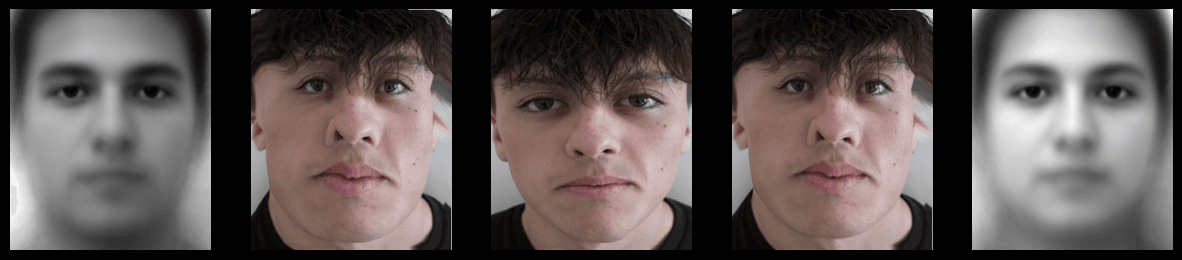
If we choose some subset of our population which exhibits a certain feature we can extrapolate that feature specifically. As an example I chose to take the average of all men in the dataset and repeat the steps above. In the image below the leftmost image is the average male face, the rightmost the average face, the center my face, and the other two extrapolations of the middle with the left and right respectively. The extrapolations have many similarities, but upon close examination difference can be seen.
PCA and Change of Basis
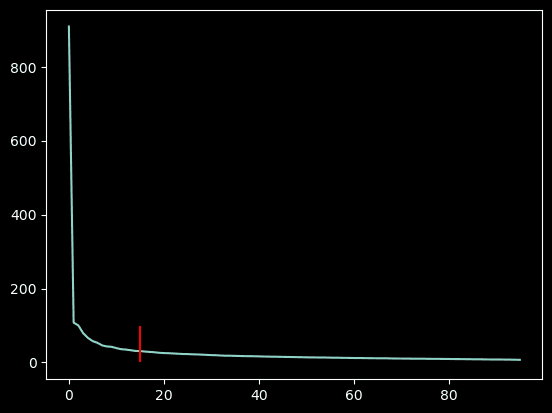
Our population of faces can be viewed from a linear algebra perspective as a subspace of images. A linear combination of faces could then act as a basis and theoretically represent any face in the subspace. From this definition alone it is difficult to determine how many basis images we would need or which images we would need to select in order to recreate any image in the subspace. Fortunately principle component analysis can help us solve this problem by providing us with R different basis images where R is some number chosen based on the distribution of variance of our population. The graph of the variance of different principle components is shown below along with a mark at where most of the variance is explained.
We can take the first R principle components of our male image dataset from before and display the principle components to see which features each principle component is detecting.

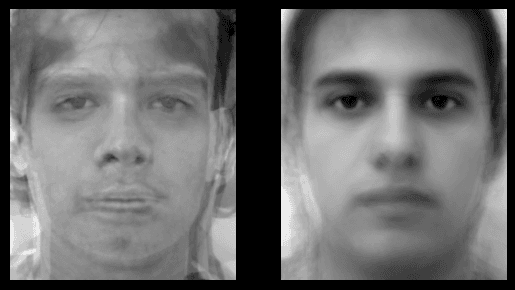
Finally we can take some random linear combination of our images and some random linear combination of our principle components, then compare the two to see how they differ. The linear combination of the first 15 images is shown on the left and the linear combination of the first 15 principle components is shown on the right. We can see that the principle components form a new face which could reasonably be in our population whereas the linear combination of the first 15 faces is not as cohesive.
Merging Multiple Faces
We can merge several faces in a row to get the following result.
Conclusion
Warping as a method of transforming images can be useful in several different domains. It can help use transform the underlying shape of an image while preserving features of the output of the original image. We can use warping to general morphs between images which have structural meaning. We can also use the average of populations of images and morph images from the population into the average image’s shape. Finally we can use PCA to get the principle components of a population of images.